
Getting started
After successfully launching swanshell, the first screen displayed is the file browser view.
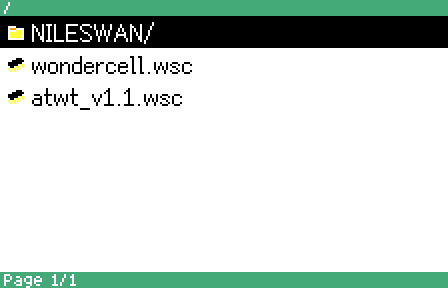
This view is the primary method of interacting with data on the nileswan’s storage card:
- The top bar displays the current directory’s path.
- The bottom bar displays the currently displayed page, as well as the total number of pages. The contents of directories can span multiple pages. You can navigate between those pages by using the
X4andX2buttons. - The middle area displays the list of files on the current page of the current directory. You can use
X1andX3to navigate between them.
To start using swanshell, use the X pad to navigate as described above, then press A to navigate into a directory or launch a file. To exit back to the parent directory, press B.
The menu also offers additional options, which can be accessed by pressing START to open a sub-menu:
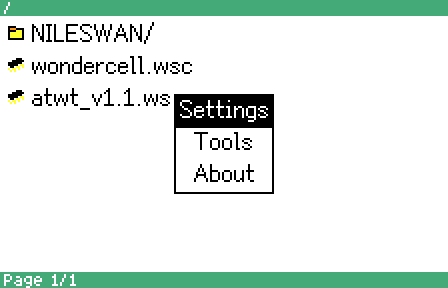
Many of these functions are explained in greater detail on later pages of the swanshell documentation.
The maximum amount of supported files per directory is slightly over 1500.
Unicode file names are supported and will be displayed to the best of the font’s ability - the large font offering better support for non-English languages at this time.
The following buttons are used in all swanshell list views:
- The
Xpad (X1,X2,X3,X4) is used to navigate the contents of the list. Other lists (such as the settings menu) work the same way! Ais used to select an option. For example, in the file browser,Amay enter a subdirectory, or launch a.wscfile.Bis used to navigate upwards. For example, in the file browser,Bwill exit a previously entered subdirectory.
Some views may have additional features mapped to the remaining buttons. For example, pressing START in the file browser brings up a menu
with additional actions. Alternatively, in the settings menu, Y1 can be used to invoke further information about a specific option.
The PCv2 uses a different button layout than the WS/WSC. The mapping between the two is as follows:
| WS/WSC | PCv2 |
|---|---|
X1 - X4 |
Up / Right / Down / Left |
A |
Circle |
B |
Clear |
START |
Esc |
Y1 |
Pass |